A monitor on the table, a scale in the bathroom, and two places to type the results. If you already record both blood pressure and weight, the useful goal is simple: keep the readings where you can find them again.
Health Scan Express records supported digital blood pressure and scale displays in one iPhone app. Your devices still take the measurements. The app helps capture the displayed values, lets you check them, and keeps the saved records in its history. It does not measure blood pressure or weight with the camera.
Keep the devices that already do the job
A digital record does not automatically require a Bluetooth replacement. You can try camera capture with a supported clear display. Compatibility depends on the display layout, visibility and image quality, so do not assume every monitor or scale will scan correctly.
This is a recording routine, not a recommendation to measure both at the same time or on a new schedule. Follow your device instructions and any measurement plan you already have from your healthcare professional.
Record the monitor result first
After your monitor finishes its measurement, open the Scan tab in Health Scan Express and capture the display. Keep the systolic, diastolic and pulse numbers visible.
On Confirm Reading, compare each captured value with the device. Correct anything that does not match, and check the date and time before tapping Save. If a digit is unclear, do not guess. Use manual entry with a result you can read, or take a new measurement according to your existing instructions.
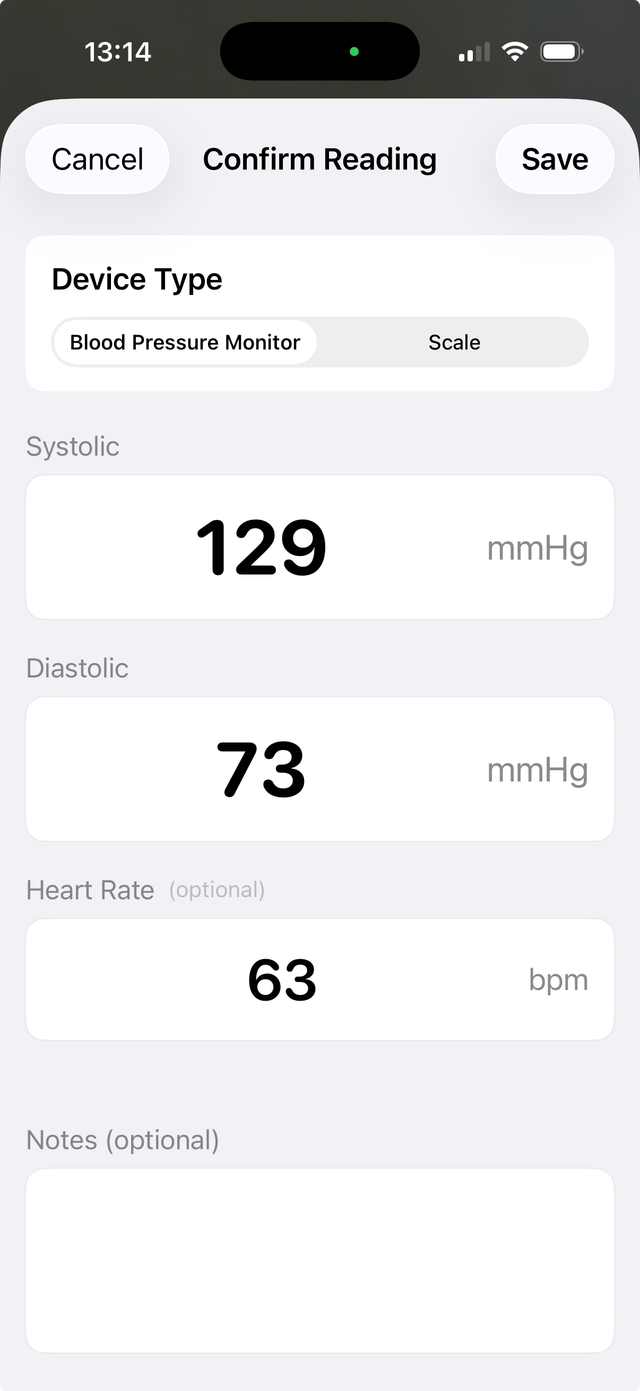
For more detail about the difference between measuring and recording, see what an iPhone can do with a blood pressure reading.
Give the scale its own checked entry
Capture the scale display while the weight is visible. On the confirmation screen, compare the number and decimal point with the scale and check the unit. Kilograms and pounds are different units, and the unit belongs in the record.
Save weight as its own entry. A weight result is not part of a blood pressure reading, even when you record both on the same day. This workflow covers weight, not every body-composition metric a scale may cycle through. If the display disappears or cycles to another metric, wait for a clear weight display or use manual entry.
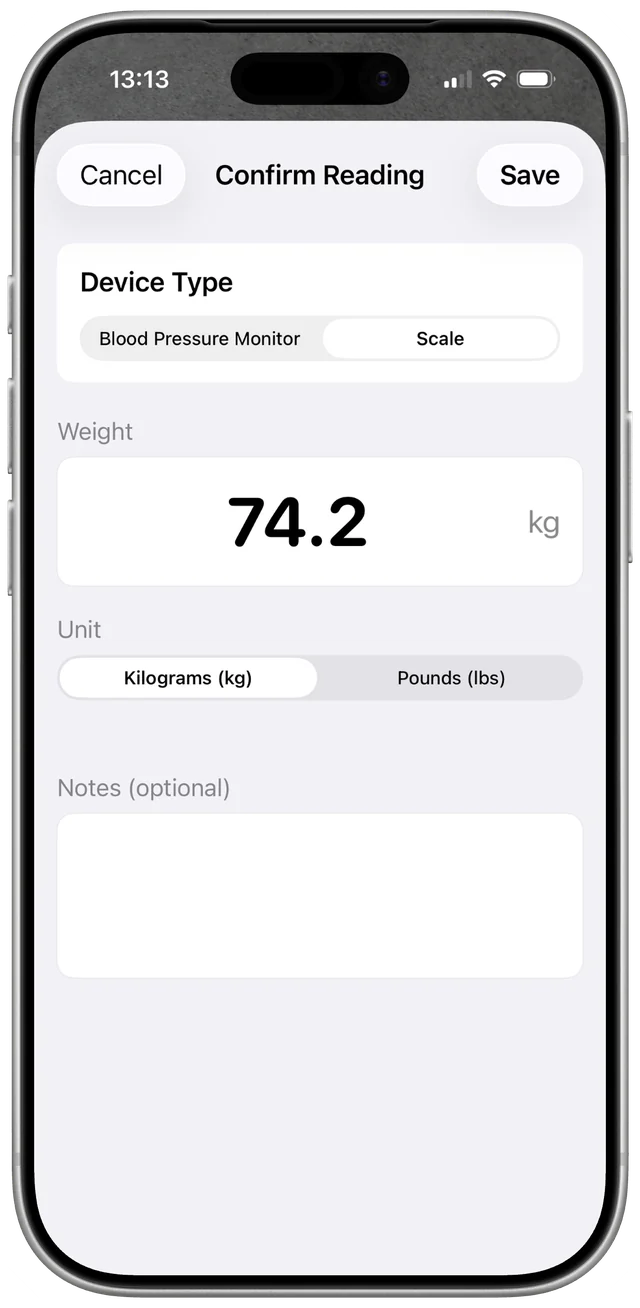
The digital scale guide shows the scale capture and review screens.
Use one app history, with separate measurements
Open Readings after saving to check that each entry is present with the expected type, value, unit and time. Use the app’s history and charts to return to the records later. Notes can add context you choose to keep; they do not interpret the reading for you.
When you need a portable record, PDF export lets you select a measurement type and date range. Review the export before sharing it, and choose your recipient. A PDF is a record you can bring to a conversation, not a diagnosis or a promise that a clinic will accept a particular format.
Apple Health is optional for each supported type
You can keep records in Health Scan Express without granting Health access. If you want supported saved readings in Apple Health too, grant the corresponding write permissions for blood pressure, heart rate or weight. Allowing one type does not guarantee that the others are enabled.
Use our Apple Health setup and troubleshooting guide to check permissions and saved entries. If another app or connected device already sends a result to Health, use one route for that measurement to avoid recording it twice.
A small checklist for your next recording session
- Capture only a clear result from the device you used.
- Compare every captured number with that display before saving.
- Check the unit, date and time.
- Confirm the saved entry in Readings. Check Health separately if you use it.
You do not need to record more measurements to use this routine. The aim is to organize the readings you already choose to take.
Try it with your own displays
New users can try two free camera scans in total. Continued camera recognition requires a subscription. Manual entry, history, charts, Apple Health integration and PDF export remain free. Check current subscription terms in the app. Camera scanning requires internet access and can send display images to third-party AI services. See the privacy policy before scanning.